Showing posts with label Promethean. Show all posts

Monday, February 21, 2011

Getting Activ with Promethean!!

  • Do you use a Promethean ActivBoard?
  • Are you going to have an ActivBoard in your classroom soon?
  • Do you have great ideas for using one that you would like to share with others?
  • Would you like to learn some tips and tricks for ways to better use you ActivBoard?
  • Did you know there are other people in this school system that would like to hear/see things you are doing with the ActivBoard in a classroom?

We are looking for more members for our WSFCS Promethean Users Group. This group of educators meets to share ideas, resources, best practices and more. We will be sharing information in actual meetings and online. Please fill out this form if you would like more information about joining this group.

We hope to continue the learning that took place at the ActivCarolina Conference last weekend. Even if you did not attend the conference, please come join the fun!

Monday, January 3, 2011

ActivPrimary in the Classroom

If you are using ActivInspire in your PreK - 1 classroom you have another alternative. You can change the look and feel of ActivInspire to benefit your younger students by setting the system to open using ActivPrimary.

To do this you will Select the Configure button from the Dashboard and then put a check in the box on the Right side of the screen that says "Launch next time using the Primary look and feel."

Don't worry I have included this video:

When you open up ActivPrimary you will immediately notice the new look. One thing to keep in mind is that some things are not in the same place as they were in ActivInspire but all the same features are still intact. When you look at your Browser window you will notice that the two icons are missing for your Page and Resource Browser. Don't worry they are now located along the bottom of the floating Toolbar. Now since the features are the same and just the look is different there is no new learning curve with the software. Everything that you could do in ActivInspire you can do in Primary. However, if you need some additional assistance you can check out resources on Promethean Planet and videos from YouTube.


images from ActivInspire and ActivPrimary
video by: eherreid

The More You Know... ActivInspire

Did you know that there are a number of combination keys in ActivInspire that offer you easy access to features that you may not be aware of. The one thing that makes ActivInspire more user friendly than before is its ease of use. The software has a lot of multi-use buttons and quick access options built in to make the tools easier to find.


Take for instance if you want to see the ActivInspire Dashboard and it is no longer showing on the screen because you closed it out. Well you could go to the View Menu because that is what you want to do, "View" the Dashboard or you could press the F11 Key. It is what I would call built in redundancy, the software offers you many different paths to get to the same end result. How about this example, for some reason in the middle of a Lesson the board seems to not want to respond to your stylus touch and you need to go to the next flipchart page. Since your board is not responding to you what do you do? Well you would go to your computer keyboard and press the Page Down Button that will advance the flipchart one page. Or maybe in the same situation you want to Copy and Paste an item from one flipchart page to another. You would be at your keyboard to press the CTRL + C (to copy) Page Down (to advance a page) then CTRL + V (to paste).


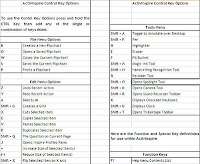
So in order to help out with some of the keyboard commands in ActivInspire, I have created a cheat sheet list of all the Control, Special and Function Key commands that you can print off to have close at hand when you are working, whether you are connected to a board or not, on your Flipcharts. If you click the image it will take you to our Wiki page where you can download the ActivInspire Special Keys pdf as well as take a look at the other information we have to offer.